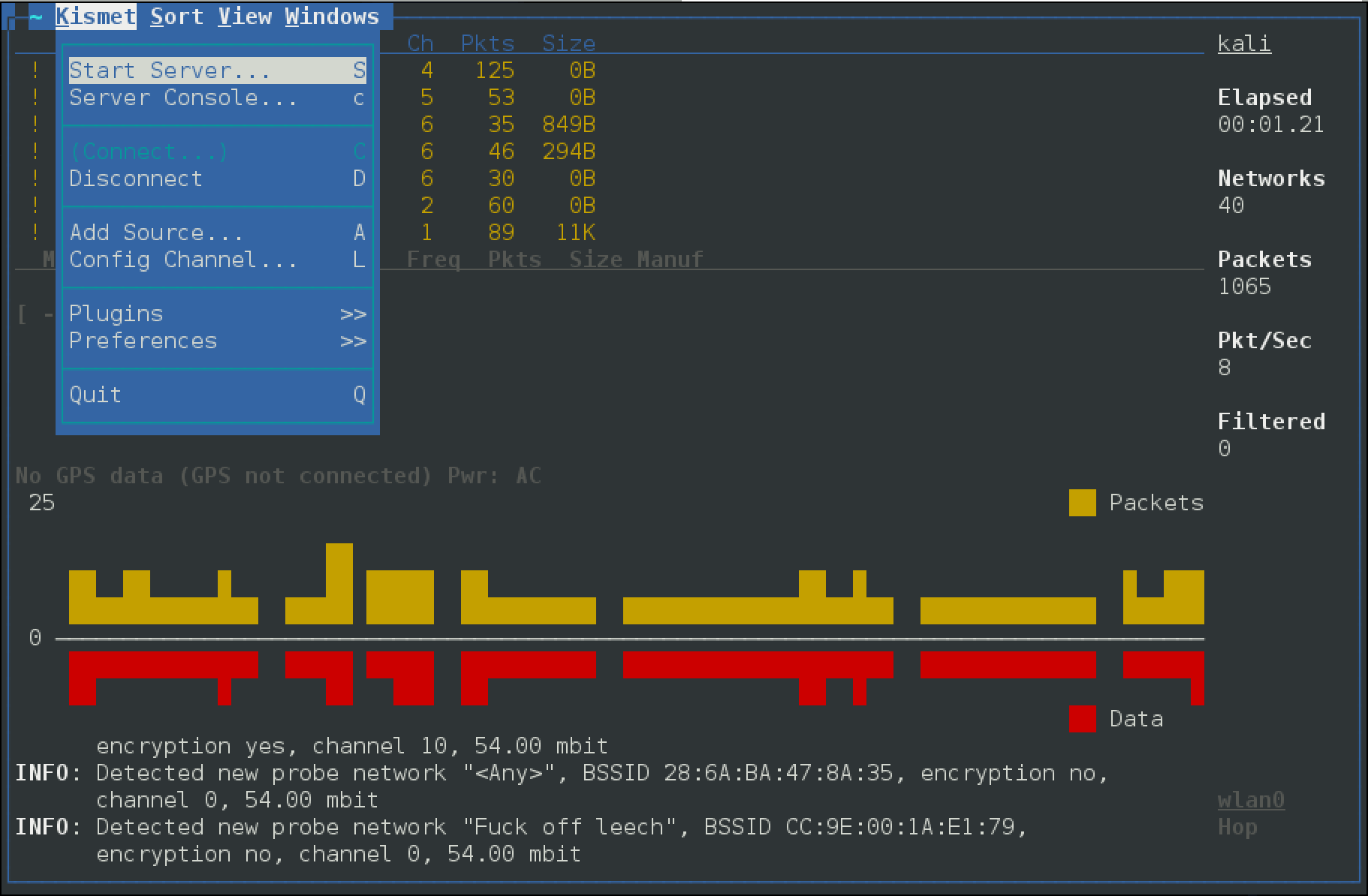
kismet
Wireless network and device detector (metapackage)
Site oficial:
https://www.kismetwireless.net/
Empacotamento:
https://gitlab.com/kalilinux/packages/kismet
Versão no Kali: 2025.09.R1-0kali3 · Arquiteturas: any all · Comandos: 33
Metapacotes:
kali-linux-default
kali-linux-everything
kali-linux-headless
kali-linux-large
kali-linux-nethunter
kali-tools-802-11
kali-tools-wireless
Documentação do Kali:
https://www.kali.org/tools/kismet/
Kismet is a wireless network and device detector, sniffer, wardriving tool, and WIDS (wireless intrusion detection) framework. Kismet works with Wi-Fi interfaces, Bluetooth interfaces, some SDR (software defined radio) hardware like the RTLSDR, and other specialized capture hardware. This is a metapackage containing the kismet tools.
sudo apt install kismet (23 KB)
Dependências: kismet-capture-antsdr-droneid, kismet-capture-freaklabs-zigbee, kismet-capture-hak5-wifi-coconut, kismet-capture-linux-bluetooth, kismet-capture-linux-wifi, kismet-capture-nrf-51822, kismet-capture-nrf-52840, kismet-capture-nrf-mousejack, kismet-capture-nxp-kw41z, kismet-capture-radiacode-usb, kismet-capture-rtl433, kismet-capture-rtladsb, kismet-capture-rz-killerbee, kismet-capture-serial-radview, kismet-capture-ti-cc-2531, kismet-capture-ti-cc-2540, kismet-capture-ubertooth-one, kismet-core, kismet-logtools
Kismet is a wireless network and device detector, sniffer, wardriving tool, and WIDS (wireless intrusion detection) framework. Kismet works with Wi-Fi interfaces, Bluetooth interfaces, some SDR (software defined radio) hardware like the RTLSDR, and other specialized capture hardware. This package contains a capture driver for Kismet. It supports sending data to a remote Kismet server.
sudo apt install kismet-capture-antsdr-droneid (190 KB)
Dependências: kismet-capture-common, libc6, libcap2, libwebsockets19t64
Escolha um comando ao lado para ver a descrição e a ajuda completa.
kismet_cap_antsdr_droneid
root@kali:~# kismet_cap_antsdr_droneid -h
kismet_cap_antsdr_droneid is a capture driver for Kismet.  Typically it is started
automatically by the Kismet server.

kismet_cap_antsdr_droneid supports sending data to a remote Kismet server
usage: kismet_cap_antsdr_droneid [options]
 --connect [host]:[port]      Connect to remote Kismet server on [host] and [port]; by
                               default this now uses the new websockets interface built
                               into the Kismet webserver on port 2501; to connect using
                               the legacy remote capture protocol, specify the '--tcp'
                               option and the appropriate port, by default port 3501.
 --tcp                        Use the legacy TCP remote capture protocol, when combined
                               with the --connect option.  The modern protocol uses
                               websockets built into the Kismet server and does not
                               need this option.
 --ssl                        Use SSL to connect to a websocket-enabled Kismet server
 --ssl-certificate [certfile] Use SSL to connect to a websocket-enabled Kismet server
                               and use the provided certificate authority certificate
                               to validate the server.
 --user [username]            Kismet username for a websockets-based remote capture
                               source.  A username and password, or an API key, are
                               required for websockets mode.  A username and password
                               are ONLY used in websockets mode.
 --password [password]        Kismet password for a websockets-based remote capture source.
                               A username and password, or an API key, are required for
                               websocket mode.  A username and password are ONLY used in
                               websockets mode.
 --apikey [api key]           A Kismet API key for the 'datasource' role; this may be
                               supplied instead of a username and password for websockets
                               based remote capture.  An API key is ONLY used in websockets
                               mode.
 --endpoint [endpoint]        An alternate endpoint for the websockets connection.  By
                               default remote datasources are terminated at
                                 /datasource/remote/remotesource.ws
                               This should typically only be changed when using a HTTP proxy
                               homing the Kismet service under a directory.  Endpoints
                               should include the full path to the websocket endpoint, for
                               example:
                                 --endpoint=/kismet/proxy/datasource/remote/remotesource.ws
 --source [source def]        Specify a source to send to the remote
                              Kismet server; only used in conjunction with remote capture.
 --disable-retry              Do not attempt to reconnect to a remote server if there is an
                               error; exit immediately.  By default a remote capture will
                               attempt to reconnect indefinitely if the server is not
                               available.
 --fixed-gps [lat,lon,alt]    Set a fixed location for this capture (remote only),
                               accepts lat,lon,alt or lat,lon
 --gps-name [name]            Set an alternate GPS name for this source
 --daemonize                  Background the capture tool and enter daemon mode.
 --list                       List supported devices detected
 --autodetect [uuid:optional] Look for a Kismet server in announcement mode, optionally
                              waiting for a specific server UUID to be seen.  Requires
                              a Kismet server configured for announcement mode.
 --version                    Print version and exit.
Kismet is a wireless network and device detector, sniffer, wardriving tool, and WIDS (wireless intrusion detection) framework. Kismet works with Wi-Fi interfaces, Bluetooth interfaces, some SDR (software defined radio) hardware like the RTLSDR, and other specialized capture hardware. This package contains the Kismet bladerf wiphy helper.
sudo apt install kismet-capture-bladerf-wiphy (202 KB)
Dependências: kismet-capture-common, libbladerf2, libc6, libcap2, libwebsockets19t64
Escolha um comando ao lado para ver a descrição e a ajuda completa.
kismet_cap_bladerf_wiphy
root@kali:~# kismet_cap_bladerf_wiphy -h
kismet_cap_bladerf_wiphy is a capture driver for Kismet.  Typically it is started
automatically by the Kismet server.

kismet_cap_bladerf_wiphy supports sending data to a remote Kismet server
usage: kismet_cap_bladerf_wiphy [options]
 --connect [host]:[port]      Connect to remote Kismet server on [host] and [port]; by
                               default this now uses the new websockets interface built
                               into the Kismet webserver on port 2501; to connect using
                               the legacy remote capture protocol, specify the '--tcp'
                               option and the appropriate port, by default port 3501.
 --tcp                        Use the legacy TCP remote capture protocol, when combined
                               with the --connect option.  The modern protocol uses
                               websockets built into the Kismet server and does not
                               need this option.
 --ssl                        Use SSL to connect to a websocket-enabled Kismet server
 --ssl-certificate [certfile] Use SSL to connect to a websocket-enabled Kismet server
                               and use the provided certificate authority certificate
                               to validate the server.
 --user [username]            Kismet username for a websockets-based remote capture
                               source.  A username and password, or an API key, are
                               required for websockets mode.  A username and password
                               are ONLY used in websockets mode.
 --password [password]        Kismet password for a websockets-based remote capture source.
                               A username and password, or an API key, are required for
                               websocket mode.  A username and password are ONLY used in
                               websockets mode.
 --apikey [api key]           A Kismet API key for the 'datasource' role; this may be
                               supplied instead of a username and password for websockets
                               based remote capture.  An API key is ONLY used in websockets
                               mode.
 --endpoint [endpoint]        An alternate endpoint for the websockets connection.  By
                               default remote datasources are terminated at
                                 /datasource/remote/remotesource.ws
                               This should typically only be changed when using a HTTP proxy
                               homing the Kismet service under a directory.  Endpoints
                               should include the full path to the websocket endpoint, for
                               example:
                                 --endpoint=/kismet/proxy/datasource/remote/remotesource.ws
 --source [source def]        Specify a source to send to the remote
                              Kismet server; only used in conjunction with remote capture.
 --disable-retry              Do not attempt to reconnect to a remote server if there is an
                               error; exit immediately.  By default a remote capture will
                               attempt to reconnect indefinitely if the server is not
                               available.
 --fixed-gps [lat,lon,alt]    Set a fixed location for this capture (remote only),
                               accepts lat,lon,alt or lat,lon
 --gps-name [name]            Set an alternate GPS name for this source
 --daemonize                  Background the capture tool and enter daemon mode.
 --list                       List supported devices detected
 --autodetect [uuid:optional] Look for a Kismet server in announcement mode, optionally
                              waiting for a specific server UUID to be seen.  Requires
                              a Kismet server configured for announcement mode.
 --version                    Print version and exit.
Kismet is a wireless network and device detector, sniffer, wardriving tool, and WIDS (wireless intrusion detection) framework. Kismet works with Wi-Fi interfaces, Bluetooth interfaces, some SDR (software defined radio) hardware like the RTLSDR, and other specialized capture hardware. This package contains the debconf files for setuid capture binaries.
sudo apt install kismet-capture-common (42 KB)
Dependências: adduser
Kismet is a wireless network and device detector, sniffer, wardriving tool, and WIDS (wireless intrusion detection) framework. Kismet works with Wi-Fi interfaces, Bluetooth interfaces, some SDR (software defined radio) hardware like the RTLSDR, and other specialized capture hardware. This package contains the Kismet Freaklabs Zigbee datasource.
sudo apt install kismet-capture-freaklabs-zigbee (197 KB)
Dependências: libc6, libcap2, libwebsockets19t64
Escolha um comando ao lado para ver a descrição e a ajuda completa.
kismet_cap_freaklabs_zigbee
root@kali:~# kismet_cap_freaklabs_zigbee -h
kismet_cap_freaklabs_zigbee is a capture driver for Kismet.  Typically it is started
automatically by the Kismet server.

kismet_cap_freaklabs_zigbee supports sending data to a remote Kismet server
usage: kismet_cap_freaklabs_zigbee [options]
 --connect [host]:[port]      Connect to remote Kismet server on [host] and [port]; by
                               default this now uses the new websockets interface built
                               into the Kismet webserver on port 2501; to connect using
                               the legacy remote capture protocol, specify the '--tcp'
                               option and the appropriate port, by default port 3501.
 --tcp                        Use the legacy TCP remote capture protocol, when combined
                               with the --connect option.  The modern protocol uses
                               websockets built into the Kismet server and does not
                               need this option.
 --ssl                        Use SSL to connect to a websocket-enabled Kismet server
 --ssl-certificate [certfile] Use SSL to connect to a websocket-enabled Kismet server
                               and use the provided certificate authority certificate
                               to validate the server.
 --user [username]            Kismet username for a websockets-based remote capture
                               source.  A username and password, or an API key, are
                               required for websockets mode.  A username and password
                               are ONLY used in websockets mode.
 --password [password]        Kismet password for a websockets-based remote capture source.
                               A username and password, or an API key, are required for
                               websocket mode.  A username and password are ONLY used in
                               websockets mode.
 --apikey [api key]           A Kismet API key for the 'datasource' role; this may be
                               supplied instead of a username and password for websockets
                               based remote capture.  An API key is ONLY used in websockets
                               mode.
 --endpoint [endpoint]        An alternate endpoint for the websockets connection.  By
                               default remote datasources are terminated at
                                 /datasource/remote/remotesource.ws
                               This should typically only be changed when using a HTTP proxy
                               homing the Kismet service under a directory.  Endpoints
                               should include the full path to the websocket endpoint, for
                               example:
                                 --endpoint=/kismet/proxy/datasource/remote/remotesource.ws
 --source [source def]        Specify a source to send to the remote
                              Kismet server; only used in conjunction with remote capture.
 --disable-retry              Do not attempt to reconnect to a remote server if there is an
                               error; exit immediately.  By default a remote capture will
                               attempt to reconnect indefinitely if the server is not
                               available.
 --fixed-gps [lat,lon,alt]    Set a fixed location for this capture (remote only),
                               accepts lat,lon,alt or lat,lon
 --gps-name [name]            Set an alternate GPS name for this source
 --daemonize                  Background the capture tool and enter daemon mode.
 --list                       List supported devices detected
 --autodetect [uuid:optional] Look for a Kismet server in announcement mode, optionally
                              waiting for a specific server UUID to be seen.  Requires
                              a Kismet server configured for announcement mode.
 --version                    Print version and exit.
Kismet is a wireless network and device detector, sniffer, wardriving tool, and WIDS (wireless intrusion detection) framework. Kismet works with Wi-Fi interfaces, Bluetooth interfaces, some SDR (software defined radio) hardware like the RTLSDR, and other specialized capture hardware. This package contains the Kismet Hak5 WiFi Coconut capture helper.
sudo apt install kismet-capture-hak5-wifi-coconut (324 KB)
Dependências: kismet-capture-common, libc6, libcap2, libusb-1.0-0, libwebsockets19t64
Escolha um comando ao lado para ver a descrição e a ajuda completa.
kismet_cap_hak5_wifi_coconut
root@kali:~# kismet_cap_hak5_wifi_coconut -h
kismet_cap_hak5_wifi_coconut is a capture driver for Kismet.  Typically it is started
automatically by the Kismet server.

kismet_cap_hak5_wifi_coconut supports sending data to a remote Kismet server
usage: kismet_cap_hak5_wifi_coconut [options]
 --connect [host]:[port]      Connect to remote Kismet server on [host] and [port]; by
                               default this now uses the new websockets interface built
                               into the Kismet webserver on port 2501; to connect using
                               the legacy remote capture protocol, specify the '--tcp'
                               option and the appropriate port, by default port 3501.
 --tcp                        Use the legacy TCP remote capture protocol, when combined
                               with the --connect option.  The modern protocol uses
                               websockets built into the Kismet server and does not
                               need this option.
 --ssl                        Use SSL to connect to a websocket-enabled Kismet server
 --ssl-certificate [certfile] Use SSL to connect to a websocket-enabled Kismet server
                               and use the provided certificate authority certificate
                               to validate the server.
 --user [username]            Kismet username for a websockets-based remote capture
                               source.  A username and password, or an API key, are
                               required for websockets mode.  A username and password
                               are ONLY used in websockets mode.
 --password [password]        Kismet password for a websockets-based remote capture source.
                               A username and password, or an API key, are required for
                               websocket mode.  A username and password are ONLY used in
                               websockets mode.
 --apikey [api key]           A Kismet API key for the 'datasource' role; this may be
                               supplied instead of a username and password for websockets
                               based remote capture.  An API key is ONLY used in websockets
                               mode.
 --endpoint [endpoint]        An alternate endpoint for the websockets connection.  By
                               default remote datasources are terminated at
                                 /datasource/remote/remotesource.ws
                               This should typically only be changed when using a HTTP proxy
                               homing the Kismet service under a directory.  Endpoints
                               should include the full path to the websocket endpoint, for
                               example:
                                 --endpoint=/kismet/proxy/datasource/remote/remotesource.ws
 --source [source def]        Specify a source to send to the remote
                              Kismet server; only used in conjunction with remote capture.
 --disable-retry              Do not attempt to reconnect to a remote server if there is an
                               error; exit immediately.  By default a remote capture will
                               attempt to reconnect indefinitely if the server is not
                               available.
 --fixed-gps [lat,lon,alt]    Set a fixed location for this capture (remote only),
                               accepts lat,lon,alt or lat,lon
 --gps-name [name]            Set an alternate GPS name for this source
 --daemonize                  Background the capture tool and enter daemon mode.
 --list                       List supported devices detected
 --autodetect [uuid:optional] Look for a Kismet server in announcement mode, optionally
                              waiting for a specific server UUID to be seen.  Requires
                              a Kismet server configured for announcement mode.
 --version                    Print version and exit.
Kismet is a wireless network and device detector, sniffer, wardriving tool, and WIDS (wireless intrusion detection) framework. Kismet works with Wi-Fi interfaces, Bluetooth interfaces, some SDR (software defined radio) hardware like the RTLSDR, and other specialized capture hardware. This package contains the Kismet Linux Bluetooth capture helper.
sudo apt install kismet-capture-linux-bluetooth (204 KB)
Dependências: kismet-capture-common, libc6, libcap2, libwebsockets19t64
Escolha um comando ao lado para ver a descrição e a ajuda completa.
kismet_cap_linux_bluetooth
root@kali:~# kismet_cap_linux_bluetooth -h
kismet_cap_linux_bluetooth is a capture driver for Kismet.  Typically it is started
automatically by the Kismet server.

kismet_cap_linux_bluetooth supports sending data to a remote Kismet server
usage: kismet_cap_linux_bluetooth [options]
 --connect [host]:[port]      Connect to remote Kismet server on [host] and [port]; by
                               default this now uses the new websockets interface built
                               into the Kismet webserver on port 2501; to connect using
                               the legacy remote capture protocol, specify the '--tcp'
                               option and the appropriate port, by default port 3501.
 --tcp                        Use the legacy TCP remote capture protocol, when combined
                               with the --connect option.  The modern protocol uses
                               websockets built into the Kismet server and does not
                               need this option.
 --ssl                        Use SSL to connect to a websocket-enabled Kismet server
 --ssl-certificate [certfile] Use SSL to connect to a websocket-enabled Kismet server
                               and use the provided certificate authority certificate
                               to validate the server.
 --user [username]            Kismet username for a websockets-based remote capture
                               source.  A username and password, or an API key, are
                               required for websockets mode.  A username and password
                               are ONLY used in websockets mode.
 --password [password]        Kismet password for a websockets-based remote capture source.
                               A username and password, or an API key, are required for
                               websocket mode.  A username and password are ONLY used in
                               websockets mode.
 --apikey [api key]           A Kismet API key for the 'datasource' role; this may be
                               supplied instead of a username and password for websockets
                               based remote capture.  An API key is ONLY used in websockets
                               mode.
 --endpoint [endpoint]        An alternate endpoint for the websockets connection.  By
                               default remote datasources are terminated at
                                 /datasource/remote/remotesource.ws
                               This should typically only be changed when using a HTTP proxy
                               homing the Kismet service under a directory.  Endpoints
                               should include the full path to the websocket endpoint, for
                               example:
                                 --endpoint=/kismet/proxy/datasource/remote/remotesource.ws
 --source [source def]        Specify a source to send to the remote
                              Kismet server; only used in conjunction with remote capture.
 --disable-retry              Do not attempt to reconnect to a remote server if there is an
                               error; exit immediately.  By default a remote capture will
                               attempt to reconnect indefinitely if the server is not
                               available.
 --fixed-gps [lat,lon,alt]    Set a fixed location for this capture (remote only),
                               accepts lat,lon,alt or lat,lon
 --gps-name [name]            Set an alternate GPS name for this source
 --daemonize                  Background the capture tool and enter daemon mode.
 --list                       List supported devices detected
 --autodetect [uuid:optional] Look for a Kismet server in announcement mode, optionally
                              waiting for a specific server UUID to be seen.  Requires
                              a Kismet server configured for announcement mode.
 --version                    Print version and exit.
Kismet is a wireless network and device detector, sniffer, wardriving tool, and WIDS (wireless intrusion detection) framework. Kismet works with Wi-Fi interfaces, Bluetooth interfaces, some SDR (software defined radio) hardware like the RTLSDR, and other specialized capture hardware. This package contains the Kismet Linux Wi-Fi capture helper.
sudo apt install kismet-capture-linux-wifi (281 KB)
Dependências: kismet-capture-common, libc6, libcap2, libglib2.0-0t64, libnl-3-200, libnl-genl-3-200, libnm0, libpcap0.8t64, libwebsockets19t64
Escolha um comando ao lado para ver a descrição e a ajuda completa.
kismet_cap_linux_wifi
root@kali:~# kismet_cap_linux_wifi -h
kismet_cap_linux_wifi is a capture driver for Kismet.  Typically it is started
automatically by the Kismet server.

kismet_cap_linux_wifi supports sending data to a remote Kismet server
usage: kismet_cap_linux_wifi [options]
 --connect [host]:[port]      Connect to remote Kismet server on [host] and [port]; by
                               default this now uses the new websockets interface built
                               into the Kismet webserver on port 2501; to connect using
                               the legacy remote capture protocol, specify the '--tcp'
                               option and the appropriate port, by default port 3501.
 --tcp                        Use the legacy TCP remote capture protocol, when combined
                               with the --connect option.  The modern protocol uses
                               websockets built into the Kismet server and does not
                               need this option.
 --ssl                        Use SSL to connect to a websocket-enabled Kismet server
 --ssl-certificate [certfile] Use SSL to connect to a websocket-enabled Kismet server
                               and use the provided certificate authority certificate
                               to validate the server.
 --user [username]            Kismet username for a websockets-based remote capture
                               source.  A username and password, or an API key, are
                               required for websockets mode.  A username and password
                               are ONLY used in websockets mode.
 --password [password]        Kismet password for a websockets-based remote capture source.
                               A username and password, or an API key, are required for
                               websocket mode.  A username and password are ONLY used in
                               websockets mode.
 --apikey [api key]           A Kismet API key for the 'datasource' role; this may be
                               supplied instead of a username and password for websockets
                               based remote capture.  An API key is ONLY used in websockets
                               mode.
 --endpoint [endpoint]        An alternate endpoint for the websockets connection.  By
                               default remote datasources are terminated at
                                 /datasource/remote/remotesource.ws
                               This should typically only be changed when using a HTTP proxy
                               homing the Kismet service under a directory.  Endpoints
                               should include the full path to the websocket endpoint, for
                               example:
                                 --endpoint=/kismet/proxy/datasource/remote/remotesource.ws
 --source [source def]        Specify a source to send to the remote
                              Kismet server; only used in conjunction with remote capture.
 --disable-retry              Do not attempt to reconnect to a remote server if there is an
                               error; exit immediately.  By default a remote capture will
                               attempt to reconnect indefinitely if the server is not
                               available.
 --fixed-gps [lat,lon,alt]    Set a fixed location for this capture (remote only),
                               accepts lat,lon,alt or lat,lon
 --gps-name [name]            Set an alternate GPS name for this source
 --daemonize                  Background the capture tool and enter daemon mode.
 --list                       List supported devices detected
 --autodetect [uuid:optional] Look for a Kismet server in announcement mode, optionally
                              waiting for a specific server UUID to be seen.  Requires
                              a Kismet server configured for announcement mode.
 --version                    Print version and exit.
Kismet is a wireless network and device detector, sniffer, wardriving tool, and WIDS (wireless intrusion detection) framework. Kismet works with Wi-Fi interfaces, Bluetooth interfaces, some SDR (software defined radio) hardware like the RTLSDR, and other specialized capture hardware. This package contains the NRF51822 BTLE Sniffer capture helper.
sudo apt install kismet-capture-nrf-51822 (196 KB)
Dependências: kismet-capture-common, libc6, libcap2, libwebsockets19t64
Escolha um comando ao lado para ver a descrição e a ajuda completa.
kismet_cap_nrf_51822
root@kali:~# kismet_cap_nrf_51822 -h
kismet_cap_nrf_51822 is a capture driver for Kismet.  Typically it is started
automatically by the Kismet server.

kismet_cap_nrf_51822 supports sending data to a remote Kismet server
usage: kismet_cap_nrf_51822 [options]
 --connect [host]:[port]      Connect to remote Kismet server on [host] and [port]; by
                               default this now uses the new websockets interface built
                               into the Kismet webserver on port 2501; to connect using
                               the legacy remote capture protocol, specify the '--tcp'
                               option and the appropriate port, by default port 3501.
 --tcp                        Use the legacy TCP remote capture protocol, when combined
                               with the --connect option.  The modern protocol uses
                               websockets built into the Kismet server and does not
                               need this option.
 --ssl                        Use SSL to connect to a websocket-enabled Kismet server
 --ssl-certificate [certfile] Use SSL to connect to a websocket-enabled Kismet server
                               and use the provided certificate authority certificate
                               to validate the server.
 --user [username]            Kismet username for a websockets-based remote capture
                               source.  A username and password, or an API key, are
                               required for websockets mode.  A username and password
                               are ONLY used in websockets mode.
 --password [password]        Kismet password for a websockets-based remote capture source.
                               A username and password, or an API key, are required for
                               websocket mode.  A username and password are ONLY used in
                               websockets mode.
 --apikey [api key]           A Kismet API key for the 'datasource' role; this may be
                               supplied instead of a username and password for websockets
                               based remote capture.  An API key is ONLY used in websockets
                               mode.
 --endpoint [endpoint]        An alternate endpoint for the websockets connection.  By
                               default remote datasources are terminated at
                                 /datasource/remote/remotesource.ws
                               This should typically only be changed when using a HTTP proxy
                               homing the Kismet service under a directory.  Endpoints
                               should include the full path to the websocket endpoint, for
                               example:
                                 --endpoint=/kismet/proxy/datasource/remote/remotesource.ws
 --source [source def]        Specify a source to send to the remote
                              Kismet server; only used in conjunction with remote capture.
 --disable-retry              Do not attempt to reconnect to a remote server if there is an
                               error; exit immediately.  By default a remote capture will
                               attempt to reconnect indefinitely if the server is not
                               available.
 --fixed-gps [lat,lon,alt]    Set a fixed location for this capture (remote only),
                               accepts lat,lon,alt or lat,lon
 --gps-name [name]            Set an alternate GPS name for this source
 --daemonize                  Background the capture tool and enter daemon mode.
 --list                       List supported devices detected
 --autodetect [uuid:optional] Look for a Kismet server in announcement mode, optionally
                              waiting for a specific server UUID to be seen.  Requires
                              a Kismet server configured for announcement mode.
 --version                    Print version and exit.
Kismet is a wireless network and device detector, sniffer, wardriving tool, and WIDS (wireless intrusion detection) framework. Kismet works with Wi-Fi interfaces, Bluetooth interfaces, some SDR (software defined radio) hardware like the RTLSDR, and other specialized capture hardware. This package contains the NRF52840 BTLE Sniffer capture helper.
sudo apt install kismet-capture-nrf-52840 (200 KB)
Dependências: kismet-capture-common, libc6, libcap2, libwebsockets19t64
Escolha um comando ao lado para ver a descrição e a ajuda completa.
kismet_cap_nrf_52840
root@kali:~# kismet_cap_nrf_52840 -h
kismet_cap_nrf_52840 is a capture driver for Kismet.  Typically it is started
automatically by the Kismet server.

kismet_cap_nrf_52840 supports sending data to a remote Kismet server
usage: kismet_cap_nrf_52840 [options]
 --connect [host]:[port]      Connect to remote Kismet server on [host] and [port]; by
                               default this now uses the new websockets interface built
                               into the Kismet webserver on port 2501; to connect using
                               the legacy remote capture protocol, specify the '--tcp'
                               option and the appropriate port, by default port 3501.
 --tcp                        Use the legacy TCP remote capture protocol, when combined
                               with the --connect option.  The modern protocol uses
                               websockets built into the Kismet server and does not
                               need this option.
 --ssl                        Use SSL to connect to a websocket-enabled Kismet server
 --ssl-certificate [certfile] Use SSL to connect to a websocket-enabled Kismet server
                               and use the provided certificate authority certificate
                               to validate the server.
 --user [username]            Kismet username for a websockets-based remote capture
                               source.  A username and password, or an API key, are
                               required for websockets mode.  A username and password
                               are ONLY used in websockets mode.
 --password [password]        Kismet password for a websockets-based remote capture source.
                               A username and password, or an API key, are required for
                               websocket mode.  A username and password are ONLY used in
                               websockets mode.
 --apikey [api key]           A Kismet API key for the 'datasource' role; this may be
                               supplied instead of a username and password for websockets
                               based remote capture.  An API key is ONLY used in websockets
                               mode.
 --endpoint [endpoint]        An alternate endpoint for the websockets connection.  By
                               default remote datasources are terminated at
                                 /datasource/remote/remotesource.ws
                               This should typically only be changed when using a HTTP proxy
                               homing the Kismet service under a directory.  Endpoints
                               should include the full path to the websocket endpoint, for
                               example:
                                 --endpoint=/kismet/proxy/datasource/remote/remotesource.ws
 --source [source def]        Specify a source to send to the remote
                              Kismet server; only used in conjunction with remote capture.
 --disable-retry              Do not attempt to reconnect to a remote server if there is an
                               error; exit immediately.  By default a remote capture will
                               attempt to reconnect indefinitely if the server is not
                               available.
 --fixed-gps [lat,lon,alt]    Set a fixed location for this capture (remote only),
                               accepts lat,lon,alt or lat,lon
 --gps-name [name]            Set an alternate GPS name for this source
 --daemonize                  Background the capture tool and enter daemon mode.
 --list                       List supported devices detected
 --autodetect [uuid:optional] Look for a Kismet server in announcement mode, optionally
                              waiting for a specific server UUID to be seen.  Requires
                              a Kismet server configured for announcement mode.
 --version                    Print version and exit.
Kismet is a wireless network and device detector, sniffer, wardriving tool, and WIDS (wireless intrusion detection) framework. Kismet works with Wi-Fi interfaces, Bluetooth interfaces, some SDR (software defined radio) hardware like the RTLSDR, and other specialized capture hardware. This package contains the Kismet nRF MouseJack capture helper.
sudo apt install kismet-capture-nrf-mousejack (200 KB)
Dependências: kismet-capture-common, libc6, libcap2, libusb-1.0-0, libwebsockets19t64
Escolha um comando ao lado para ver a descrição e a ajuda completa.
kismet_cap_nrf_mousejack
root@kali:~# kismet_cap_nrf_mousejack -h
kismet_cap_nrf_mousejack is a capture driver for Kismet.  Typically it is started
automatically by the Kismet server.

kismet_cap_nrf_mousejack supports sending data to a remote Kismet server
usage: kismet_cap_nrf_mousejack [options]
 --connect [host]:[port]      Connect to remote Kismet server on [host] and [port]; by
                               default this now uses the new websockets interface built
                               into the Kismet webserver on port 2501; to connect using
                               the legacy remote capture protocol, specify the '--tcp'
                               option and the appropriate port, by default port 3501.
 --tcp                        Use the legacy TCP remote capture protocol, when combined
                               with the --connect option.  The modern protocol uses
                               websockets built into the Kismet server and does not
                               need this option.
 --ssl                        Use SSL to connect to a websocket-enabled Kismet server
 --ssl-certificate [certfile] Use SSL to connect to a websocket-enabled Kismet server
                               and use the provided certificate authority certificate
                               to validate the server.
 --user [username]            Kismet username for a websockets-based remote capture
                               source.  A username and password, or an API key, are
                               required for websockets mode.  A username and password
                               are ONLY used in websockets mode.
 --password [password]        Kismet password for a websockets-based remote capture source.
                               A username and password, or an API key, are required for
                               websocket mode.  A username and password are ONLY used in
                               websockets mode.
 --apikey [api key]           A Kismet API key for the 'datasource' role; this may be
                               supplied instead of a username and password for websockets
                               based remote capture.  An API key is ONLY used in websockets
                               mode.
 --endpoint [endpoint]        An alternate endpoint for the websockets connection.  By
                               default remote datasources are terminated at
                                 /datasource/remote/remotesource.ws
                               This should typically only be changed when using a HTTP proxy
                               homing the Kismet service under a directory.  Endpoints
                               should include the full path to the websocket endpoint, for
                               example:
                                 --endpoint=/kismet/proxy/datasource/remote/remotesource.ws
 --source [source def]        Specify a source to send to the remote
                              Kismet server; only used in conjunction with remote capture.
 --disable-retry              Do not attempt to reconnect to a remote server if there is an
                               error; exit immediately.  By default a remote capture will
                               attempt to reconnect indefinitely if the server is not
                               available.
 --fixed-gps [lat,lon,alt]    Set a fixed location for this capture (remote only),
                               accepts lat,lon,alt or lat,lon
 --gps-name [name]            Set an alternate GPS name for this source
 --daemonize                  Background the capture tool and enter daemon mode.
 --list                       List supported devices detected
 --autodetect [uuid:optional] Look for a Kismet server in announcement mode, optionally
                              waiting for a specific server UUID to be seen.  Requires
                              a Kismet server configured for announcement mode.
 --version                    Print version and exit.
Kismet is a wireless network and device detector, sniffer, wardriving tool, and WIDS (wireless intrusion detection) framework. Kismet works with Wi-Fi interfaces, Bluetooth interfaces, some SDR (software defined radio) hardware like the RTLSDR, and other specialized capture hardware. This package contains the Kismet NXP KW41Z BTLE and Zigbee Sniffer capture helper.
sudo apt install kismet-capture-nxp-kw41z (204 KB)
Dependências: kismet-capture-common, libc6, libcap2, libwebsockets19t64
Escolha um comando ao lado para ver a descrição e a ajuda completa.
kismet_cap_nxp_kw41z
root@kali:~# kismet_cap_nxp_kw41z -h
kismet_cap_nxp_kw41z is a capture driver for Kismet.  Typically it is started
automatically by the Kismet server.

kismet_cap_nxp_kw41z supports sending data to a remote Kismet server
usage: kismet_cap_nxp_kw41z [options]
 --connect [host]:[port]      Connect to remote Kismet server on [host] and [port]; by
                               default this now uses the new websockets interface built
                               into the Kismet webserver on port 2501; to connect using
                               the legacy remote capture protocol, specify the '--tcp'
                               option and the appropriate port, by default port 3501.
 --tcp                        Use the legacy TCP remote capture protocol, when combined
                               with the --connect option.  The modern protocol uses
                               websockets built into the Kismet server and does not
                               need this option.
 --ssl                        Use SSL to connect to a websocket-enabled Kismet server
 --ssl-certificate [certfile] Use SSL to connect to a websocket-enabled Kismet server
                               and use the provided certificate authority certificate
                               to validate the server.
 --user [username]            Kismet username for a websockets-based remote capture
                               source.  A username and password, or an API key, are
                               required for websockets mode.  A username and password
                               are ONLY used in websockets mode.
 --password [password]        Kismet password for a websockets-based remote capture source.
                               A username and password, or an API key, are required for
                               websocket mode.  A username and password are ONLY used in
                               websockets mode.
 --apikey [api key]           A Kismet API key for the 'datasource' role; this may be
                               supplied instead of a username and password for websockets
                               based remote capture.  An API key is ONLY used in websockets
                               mode.
 --endpoint [endpoint]        An alternate endpoint for the websockets connection.  By
                               default remote datasources are terminated at
                                 /datasource/remote/remotesource.ws
                               This should typically only be changed when using a HTTP proxy
                               homing the Kismet service under a directory.  Endpoints
                               should include the full path to the websocket endpoint, for
                               example:
                                 --endpoint=/kismet/proxy/datasource/remote/remotesource.ws
 --source [source def]        Specify a source to send to the remote
                              Kismet server; only used in conjunction with remote capture.
 --disable-retry              Do not attempt to reconnect to a remote server if there is an
                               error; exit immediately.  By default a remote capture will
                               attempt to reconnect indefinitely if the server is not
                               available.
 --fixed-gps [lat,lon,alt]    Set a fixed location for this capture (remote only),
                               accepts lat,lon,alt or lat,lon
 --gps-name [name]            Set an alternate GPS name for this source
 --daemonize                  Background the capture tool and enter daemon mode.
 --list                       List supported devices detected
 --autodetect [uuid:optional] Look for a Kismet server in announcement mode, optionally
                              waiting for a specific server UUID to be seen.  Requires
                              a Kismet server configured for announcement mode.
 --version                    Print version and exit.
Kismet is a wireless network and device detector, sniffer, wardriving tool, and WIDS (wireless intrusion detection) framework. Kismet works with Wi-Fi interfaces, Bluetooth interfaces, some SDR (software defined radio) hardware like the RTLSDR, and other specialized capture hardware. This package contains the Kismet radiacode usb helper.
sudo apt install kismet-capture-radiacode-usb (198 KB)
Dependências: kismet-capture-common, libc6, libcap2, libusb-1.0-0, libwebsockets19t64
Escolha um comando ao lado para ver a descrição e a ajuda completa.
kismet_cap_radiacode_usb
root@kali:~# kismet_cap_radiacode_usb -h
kismet_cap_radiacode_usb is a capture driver for Kismet.  Typically it is started
automatically by the Kismet server.

kismet_cap_radiacode_usb supports sending data to a remote Kismet server
usage: kismet_cap_radiacode_usb [options]
 --connect [host]:[port]      Connect to remote Kismet server on [host] and [port]; by
                               default this now uses the new websockets interface built
                               into the Kismet webserver on port 2501; to connect using
                               the legacy remote capture protocol, specify the '--tcp'
                               option and the appropriate port, by default port 3501.
 --tcp                        Use the legacy TCP remote capture protocol, when combined
                               with the --connect option.  The modern protocol uses
                               websockets built into the Kismet server and does not
                               need this option.
 --ssl                        Use SSL to connect to a websocket-enabled Kismet server
 --ssl-certificate [certfile] Use SSL to connect to a websocket-enabled Kismet server
                               and use the provided certificate authority certificate
                               to validate the server.
 --user [username]            Kismet username for a websockets-based remote capture
                               source.  A username and password, or an API key, are
                               required for websockets mode.  A username and password
                               are ONLY used in websockets mode.
 --password [password]        Kismet password for a websockets-based remote capture source.
                               A username and password, or an API key, are required for
                               websocket mode.  A username and password are ONLY used in
                               websockets mode.
 --apikey [api key]           A Kismet API key for the 'datasource' role; this may be
                               supplied instead of a username and password for websockets
                               based remote capture.  An API key is ONLY used in websockets
                               mode.
 --endpoint [endpoint]        An alternate endpoint for the websockets connection.  By
                               default remote datasources are terminated at
                                 /datasource/remote/remotesource.ws
                               This should typically only be changed when using a HTTP proxy
                               homing the Kismet service under a directory.  Endpoints
                               should include the full path to the websocket endpoint, for
                               example:
                                 --endpoint=/kismet/proxy/datasource/remote/remotesource.ws
 --source [source def]        Specify a source to send to the remote
                              Kismet server; only used in conjunction with remote capture.
 --disable-retry              Do not attempt to reconnect to a remote server if there is an
                               error; exit immediately.  By default a remote capture will
                               attempt to reconnect indefinitely if the server is not
                               available.
 --fixed-gps [lat,lon,alt]    Set a fixed location for this capture (remote only),
                               accepts lat,lon,alt or lat,lon
 --gps-name [name]            Set an alternate GPS name for this source
 --daemonize                  Background the capture tool and enter daemon mode.
 --list                       List supported devices detected
 --autodetect [uuid:optional] Look for a Kismet server in announcement mode, optionally
                              waiting for a specific server UUID to be seen.  Requires
                              a Kismet server configured for announcement mode.
 --version                    Print version and exit.
Kismet is a wireless network and device detector, sniffer, wardriving tool, and WIDS (wireless intrusion detection) framework. Kismet works with Wi-Fi interfaces, Bluetooth interfaces, some SDR (software defined radio) hardware like the RTLSDR, and other specialized capture hardware. This package contains the Kismet rtl_433 datasource.
sudo apt install kismet-capture-rtl433 (197 KB)
Dependências: libc6, libcap2, librtlsdr0, libwebsockets19t64
Escolha um comando ao lado para ver a descrição e a ajuda completa.
kismet_cap_sdr_rtl433
root@kali:~# kismet_cap_sdr_rtl433 -h
kismet_cap_sdr_rtl433 is a capture driver for Kismet.  Typically it is started
automatically by the Kismet server.

kismet_cap_sdr_rtl433 supports sending data to a remote Kismet server
usage: kismet_cap_sdr_rtl433 [options]
 --connect [host]:[port]      Connect to remote Kismet server on [host] and [port]; by
                               default this now uses the new websockets interface built
                               into the Kismet webserver on port 2501; to connect using
                               the legacy remote capture protocol, specify the '--tcp'
                               option and the appropriate port, by default port 3501.
 --tcp                        Use the legacy TCP remote capture protocol, when combined
                               with the --connect option.  The modern protocol uses
                               websockets built into the Kismet server and does not
                               need this option.
 --ssl                        Use SSL to connect to a websocket-enabled Kismet server
 --ssl-certificate [certfile] Use SSL to connect to a websocket-enabled Kismet server
                               and use the provided certificate authority certificate
                               to validate the server.
 --user [username]            Kismet username for a websockets-based remote capture
                               source.  A username and password, or an API key, are
                               required for websockets mode.  A username and password
                               are ONLY used in websockets mode.
 --password [password]        Kismet password for a websockets-based remote capture source.
                               A username and password, or an API key, are required for
                               websocket mode.  A username and password are ONLY used in
                               websockets mode.
 --apikey [api key]           A Kismet API key for the 'datasource' role; this may be
                               supplied instead of a username and password for websockets
                               based remote capture.  An API key is ONLY used in websockets
                               mode.
 --endpoint [endpoint]        An alternate endpoint for the websockets connection.  By
                               default remote datasources are terminated at
                                 /datasource/remote/remotesource.ws
                               This should typically only be changed when using a HTTP proxy
                               homing the Kismet service under a directory.  Endpoints
                               should include the full path to the websocket endpoint, for
                               example:
                                 --endpoint=/kismet/proxy/datasource/remote/remotesource.ws
 --source [source def]        Specify a source to send to the remote
                              Kismet server; only used in conjunction with remote capture.
 --disable-retry              Do not attempt to reconnect to a remote server if there is an
                               error; exit immediately.  By default a remote capture will
                               attempt to reconnect indefinitely if the server is not
                               available.
 --fixed-gps [lat,lon,alt]    Set a fixed location for this capture (remote only),
                               accepts lat,lon,alt or lat,lon
 --gps-name [name]            Set an alternate GPS name for this source
 --daemonize                  Background the capture tool and enter daemon mode.
 --list                       List supported devices detected
 --autodetect [uuid:optional] Look for a Kismet server in announcement mode, optionally
                              waiting for a specific server UUID to be seen.  Requires
                              a Kismet server configured for announcement mode.
 --version                    Print version and exit.
Kismet is a wireless network and device detector, sniffer, wardriving tool, and WIDS (wireless intrusion detection) framework. Kismet works with Wi-Fi interfaces, Bluetooth interfaces, some SDR (software defined radio) hardware like the RTLSDR, and other specialized capture hardware. This package contains the Kismet rtladsb datasource.
sudo apt install kismet-capture-rtladsb (202 KB)
Dependências: libc6, libcap2, librtlsdr0, libwebsockets19t64
Escolha um comando ao lado para ver a descrição e a ajuda completa.
kismet_cap_sdr_rtladsb
root@kali:~# kismet_cap_sdr_rtladsb -h
kismet_cap_sdr_rtladsb is a capture driver for Kismet.  Typically it is started
automatically by the Kismet server.

kismet_cap_sdr_rtladsb supports sending data to a remote Kismet server
usage: kismet_cap_sdr_rtladsb [options]
 --connect [host]:[port]      Connect to remote Kismet server on [host] and [port]; by
                               default this now uses the new websockets interface built
                               into the Kismet webserver on port 2501; to connect using
                               the legacy remote capture protocol, specify the '--tcp'
                               option and the appropriate port, by default port 3501.
 --tcp                        Use the legacy TCP remote capture protocol, when combined
                               with the --connect option.  The modern protocol uses
                               websockets built into the Kismet server and does not
                               need this option.
 --ssl                        Use SSL to connect to a websocket-enabled Kismet server
 --ssl-certificate [certfile] Use SSL to connect to a websocket-enabled Kismet server
                               and use the provided certificate authority certificate
                               to validate the server.
 --user [username]            Kismet username for a websockets-based remote capture
                               source.  A username and password, or an API key, are
                               required for websockets mode.  A username and password
                               are ONLY used in websockets mode.
 --password [password]        Kismet password for a websockets-based remote capture source.
                               A username and password, or an API key, are required for
                               websocket mode.  A username and password are ONLY used in
                               websockets mode.
 --apikey [api key]           A Kismet API key for the 'datasource' role; this may be
                               supplied instead of a username and password for websockets
                               based remote capture.  An API key is ONLY used in websockets
                               mode.
 --endpoint [endpoint]        An alternate endpoint for the websockets connection.  By
                               default remote datasources are terminated at
                                 /datasource/remote/remotesource.ws
                               This should typically only be changed when using a HTTP proxy
                               homing the Kismet service under a directory.  Endpoints
                               should include the full path to the websocket endpoint, for
                               example:
                                 --endpoint=/kismet/proxy/datasource/remote/remotesource.ws
 --source [source def]        Specify a source to send to the remote
                              Kismet server; only used in conjunction with remote capture.
 --disable-retry              Do not attempt to reconnect to a remote server if there is an
                               error; exit immediately.  By default a remote capture will
                               attempt to reconnect indefinitely if the server is not
                               available.
 --fixed-gps [lat,lon,alt]    Set a fixed location for this capture (remote only),
                               accepts lat,lon,alt or lat,lon
 --gps-name [name]            Set an alternate GPS name for this source
 --daemonize                  Background the capture tool and enter daemon mode.
 --list                       List supported devices detected
 --autodetect [uuid:optional] Look for a Kismet server in announcement mode, optionally
                              waiting for a specific server UUID to be seen.  Requires
                              a Kismet server configured for announcement mode.
 --version                    Print version and exit.
Kismet is a wireless network and device detector, sniffer, wardriving tool, and WIDS (wireless intrusion detection) framework. Kismet works with Wi-Fi interfaces, Bluetooth interfaces, some SDR (software defined radio) hardware like the RTLSDR, and other specialized capture hardware. This package contains the Kismet Killerbee Sniffer capture helper.
sudo apt install kismet-capture-rz-killerbee (204 KB)
Dependências: kismet-capture-common, libc6, libcap2, libusb-1.0-0, libwebsockets19t64
Escolha um comando ao lado para ver a descrição e a ajuda completa.
kismet_cap_rz_killerbee
root@kali:~# kismet_cap_rz_killerbee -h
kismet_cap_rz_killerbee is a capture driver for Kismet.  Typically it is started
automatically by the Kismet server.

kismet_cap_rz_killerbee supports sending data to a remote Kismet server
usage: kismet_cap_rz_killerbee [options]
 --connect [host]:[port]      Connect to remote Kismet server on [host] and [port]; by
                               default this now uses the new websockets interface built
                               into the Kismet webserver on port 2501; to connect using
                               the legacy remote capture protocol, specify the '--tcp'
                               option and the appropriate port, by default port 3501.
 --tcp                        Use the legacy TCP remote capture protocol, when combined
                               with the --connect option.  The modern protocol uses
                               websockets built into the Kismet server and does not
                               need this option.
 --ssl                        Use SSL to connect to a websocket-enabled Kismet server
 --ssl-certificate [certfile] Use SSL to connect to a websocket-enabled Kismet server
                               and use the provided certificate authority certificate
                               to validate the server.
 --user [username]            Kismet username for a websockets-based remote capture
                               source.  A username and password, or an API key, are
                               required for websockets mode.  A username and password
                               are ONLY used in websockets mode.
 --password [password]        Kismet password for a websockets-based remote capture source.
                               A username and password, or an API key, are required for
                               websocket mode.  A username and password are ONLY used in
                               websockets mode.
 --apikey [api key]           A Kismet API key for the 'datasource' role; this may be
                               supplied instead of a username and password for websockets
                               based remote capture.  An API key is ONLY used in websockets
                               mode.
 --endpoint [endpoint]        An alternate endpoint for the websockets connection.  By
                               default remote datasources are terminated at
                                 /datasource/remote/remotesource.ws
                               This should typically only be changed when using a HTTP proxy
                               homing the Kismet service under a directory.  Endpoints
                               should include the full path to the websocket endpoint, for
                               example:
                                 --endpoint=/kismet/proxy/datasource/remote/remotesource.ws
 --source [source def]        Specify a source to send to the remote
                              Kismet server; only used in conjunction with remote capture.
 --disable-retry              Do not attempt to reconnect to a remote server if there is an
                               error; exit immediately.  By default a remote capture will
                               attempt to reconnect indefinitely if the server is not
                               available.
 --fixed-gps [lat,lon,alt]    Set a fixed location for this capture (remote only),
                               accepts lat,lon,alt or lat,lon
 --gps-name [name]            Set an alternate GPS name for this source
 --daemonize                  Background the capture tool and enter daemon mode.
 --list                       List supported devices detected
 --autodetect [uuid:optional] Look for a Kismet server in announcement mode, optionally
                              waiting for a specific server UUID to be seen.  Requires
                              a Kismet server configured for announcement mode.
 --version                    Print version and exit.
Kismet is a wireless network and device detector, sniffer, wardriving tool, and WIDS (wireless intrusion detection) framework. Kismet works with Wi-Fi interfaces, Bluetooth interfaces, some SDR (software defined radio) hardware like the RTLSDR, and other specialized capture hardware. This package contains the Kismet serial radview helper.
sudo apt install kismet-capture-serial-radview (190 KB)
Dependências: kismet-capture-common, libc6, libcap2, libwebsockets19t64
Escolha um comando ao lado para ver a descrição e a ajuda completa.
kismet_cap_serial_radview
root@kali:~# kismet_cap_serial_radview -h
kismet_cap_serial_radview is a capture driver for Kismet.  Typically it is started
automatically by the Kismet server.

kismet_cap_serial_radview supports sending data to a remote Kismet server
usage: kismet_cap_serial_radview [options]
 --connect [host]:[port]      Connect to remote Kismet server on [host] and [port]; by
                               default this now uses the new websockets interface built
                               into the Kismet webserver on port 2501; to connect using
                               the legacy remote capture protocol, specify the '--tcp'
                               option and the appropriate port, by default port 3501.
 --tcp                        Use the legacy TCP remote capture protocol, when combined
                               with the --connect option.  The modern protocol uses
                               websockets built into the Kismet server and does not
                               need this option.
 --ssl                        Use SSL to connect to a websocket-enabled Kismet server
 --ssl-certificate [certfile] Use SSL to connect to a websocket-enabled Kismet server
                               and use the provided certificate authority certificate
                               to validate the server.
 --user [username]            Kismet username for a websockets-based remote capture
                               source.  A username and password, or an API key, are
                               required for websockets mode.  A username and password
                               are ONLY used in websockets mode.
 --password [password]        Kismet password for a websockets-based remote capture source.
                               A username and password, or an API key, are required for
                               websocket mode.  A username and password are ONLY used in
                               websockets mode.
 --apikey [api key]           A Kismet API key for the 'datasource' role; this may be
                               supplied instead of a username and password for websockets
                               based remote capture.  An API key is ONLY used in websockets
                               mode.
 --endpoint [endpoint]        An alternate endpoint for the websockets connection.  By
                               default remote datasources are terminated at
                                 /datasource/remote/remotesource.ws
                               This should typically only be changed when using a HTTP proxy
                               homing the Kismet service under a directory.  Endpoints
                               should include the full path to the websocket endpoint, for
                               example:
                                 --endpoint=/kismet/proxy/datasource/remote/remotesource.ws
 --source [source def]        Specify a source to send to the remote
                              Kismet server; only used in conjunction with remote capture.
 --disable-retry              Do not attempt to reconnect to a remote server if there is an
                               error; exit immediately.  By default a remote capture will
                               attempt to reconnect indefinitely if the server is not
                               available.
 --fixed-gps [lat,lon,alt]    Set a fixed location for this capture (remote only),
                               accepts lat,lon,alt or lat,lon
 --gps-name [name]            Set an alternate GPS name for this source
 --daemonize                  Background the capture tool and enter daemon mode.
 --list                       List supported devices detected
 --autodetect [uuid:optional] Look for a Kismet server in announcement mode, optionally
                              waiting for a specific server UUID to be seen.  Requires
                              a Kismet server configured for announcement mode.
 --version                    Print version and exit.
Kismet is a wireless network and device detector, sniffer, wardriving tool, and WIDS (wireless intrusion detection) framework. Kismet works with Wi-Fi interfaces, Bluetooth interfaces, some SDR (software defined radio) hardware like the RTLSDR, and other specialized capture hardware. This package contains the Kismet TICC2531 802.15.4 Zigbee Sniffer capture helper.
sudo apt install kismet-capture-ti-cc-2531 (204 KB)
Dependências: kismet-capture-common, libc6, libcap2, libusb-1.0-0, libwebsockets19t64
Escolha um comando ao lado para ver a descrição e a ajuda completa.
kismet_cap_ti_cc_2531
root@kali:~# kismet_cap_ti_cc_2531 -h
kismet_cap_ti_cc_2531 is a capture driver for Kismet.  Typically it is started
automatically by the Kismet server.

kismet_cap_ti_cc_2531 supports sending data to a remote Kismet server
usage: kismet_cap_ti_cc_2531 [options]
 --connect [host]:[port]      Connect to remote Kismet server on [host] and [port]; by
                               default this now uses the new websockets interface built
                               into the Kismet webserver on port 2501; to connect using
                               the legacy remote capture protocol, specify the '--tcp'
                               option and the appropriate port, by default port 3501.
 --tcp                        Use the legacy TCP remote capture protocol, when combined
                               with the --connect option.  The modern protocol uses
                               websockets built into the Kismet server and does not
                               need this option.
 --ssl                        Use SSL to connect to a websocket-enabled Kismet server
 --ssl-certificate [certfile] Use SSL to connect to a websocket-enabled Kismet server
                               and use the provided certificate authority certificate
                               to validate the server.
 --user [username]            Kismet username for a websockets-based remote capture
                               source.  A username and password, or an API key, are
                               required for websockets mode.  A username and password
                               are ONLY used in websockets mode.
 --password [password]        Kismet password for a websockets-based remote capture source.
                               A username and password, or an API key, are required for
                               websocket mode.  A username and password are ONLY used in
                               websockets mode.
 --apikey [api key]           A Kismet API key for the 'datasource' role; this may be
                               supplied instead of a username and password for websockets
                               based remote capture.  An API key is ONLY used in websockets
                               mode.
 --endpoint [endpoint]        An alternate endpoint for the websockets connection.  By
                               default remote datasources are terminated at
                                 /datasource/remote/remotesource.ws
                               This should typically only be changed when using a HTTP proxy
                               homing the Kismet service under a directory.  Endpoints
                               should include the full path to the websocket endpoint, for
                               example:
                                 --endpoint=/kismet/proxy/datasource/remote/remotesource.ws
 --source [source def]        Specify a source to send to the remote
                              Kismet server; only used in conjunction with remote capture.
 --disable-retry              Do not attempt to reconnect to a remote server if there is an
                               error; exit immediately.  By default a remote capture will
                               attempt to reconnect indefinitely if the server is not
                               available.
 --fixed-gps [lat,lon,alt]    Set a fixed location for this capture (remote only),
                               accepts lat,lon,alt or lat,lon
 --gps-name [name]            Set an alternate GPS name for this source
 --daemonize                  Background the capture tool and enter daemon mode.
 --list                       List supported devices detected
 --autodetect [uuid:optional] Look for a Kismet server in announcement mode, optionally
                              waiting for a specific server UUID to be seen.  Requires
                              a Kismet server configured for announcement mode.
 --version                    Print version and exit.
Kismet is a wireless network and device detector, sniffer, wardriving tool, and WIDS (wireless intrusion detection) framework. Kismet works with Wi-Fi interfaces, Bluetooth interfaces, some SDR (software defined radio) hardware like the RTLSDR, and other specialized capture hardware. This package contains the Kismet TICC2540 BTLE Sniffer capture helper.
sudo apt install kismet-capture-ti-cc-2540 (204 KB)
Dependências: kismet-capture-common, libc6, libcap2, libusb-1.0-0, libwebsockets19t64
Escolha um comando ao lado para ver a descrição e a ajuda completa.
kismet_cap_ti_cc_2540
root@kali:~# kismet_cap_ti_cc_2540 -h
kismet_cap_ti_cc_2540 is a capture driver for Kismet.  Typically it is started
automatically by the Kismet server.

kismet_cap_ti_cc_2540 supports sending data to a remote Kismet server
usage: kismet_cap_ti_cc_2540 [options]
 --connect [host]:[port]      Connect to remote Kismet server on [host] and [port]; by
                               default this now uses the new websockets interface built
                               into the Kismet webserver on port 2501; to connect using
                               the legacy remote capture protocol, specify the '--tcp'
                               option and the appropriate port, by default port 3501.
 --tcp                        Use the legacy TCP remote capture protocol, when combined
                               with the --connect option.  The modern protocol uses
                               websockets built into the Kismet server and does not
                               need this option.
 --ssl                        Use SSL to connect to a websocket-enabled Kismet server
 --ssl-certificate [certfile] Use SSL to connect to a websocket-enabled Kismet server
                               and use the provided certificate authority certificate
                               to validate the server.
 --user [username]            Kismet username for a websockets-based remote capture
                               source.  A username and password, or an API key, are
                               required for websockets mode.  A username and password
                               are ONLY used in websockets mode.
 --password [password]        Kismet password for a websockets-based remote capture source.
                               A username and password, or an API key, are required for
                               websocket mode.  A username and password are ONLY used in
                               websockets mode.
 --apikey [api key]           A Kismet API key for the 'datasource' role; this may be
                               supplied instead of a username and password for websockets
                               based remote capture.  An API key is ONLY used in websockets
                               mode.
 --endpoint [endpoint]        An alternate endpoint for the websockets connection.  By
                               default remote datasources are terminated at
                                 /datasource/remote/remotesource.ws
                               This should typically only be changed when using a HTTP proxy
                               homing the Kismet service under a directory.  Endpoints
                               should include the full path to the websocket endpoint, for
                               example:
                                 --endpoint=/kismet/proxy/datasource/remote/remotesource.ws
 --source [source def]        Specify a source to send to the remote
                              Kismet server; only used in conjunction with remote capture.
 --disable-retry              Do not attempt to reconnect to a remote server if there is an
                               error; exit immediately.  By default a remote capture will
                               attempt to reconnect indefinitely if the server is not
                               available.
 --fixed-gps [lat,lon,alt]    Set a fixed location for this capture (remote only),
                               accepts lat,lon,alt or lat,lon
 --gps-name [name]            Set an alternate GPS name for this source
 --daemonize                  Background the capture tool and enter daemon mode.
 --list                       List supported devices detected
 --autodetect [uuid:optional] Look for a Kismet server in announcement mode, optionally
                              waiting for a specific server UUID to be seen.  Requires
                              a Kismet server configured for announcement mode.
 --version                    Print version and exit.
Kismet is a wireless network and device detector, sniffer, wardriving tool, and WIDS (wireless intrusion detection) framework. Kismet works with Wi-Fi interfaces, Bluetooth interfaces, some SDR (software defined radio) hardware like the RTLSDR, and other specialized capture hardware. This package contains the Kismet Ubertooth One BT Sniffer capture helper.
sudo apt install kismet-capture-ubertooth-one (200 KB)
Dependências: kismet-capture-common, libc6, libcap2, libubertooth1, libwebsockets19t64
Escolha um comando ao lado para ver a descrição e a ajuda completa.
kismet_cap_ubertooth_one
root@kali:~# kismet_cap_ubertooth_one -h
kismet_cap_ubertooth_one is a capture driver for Kismet.  Typically it is started
automatically by the Kismet server.

kismet_cap_ubertooth_one supports sending data to a remote Kismet server
usage: kismet_cap_ubertooth_one [options]
 --connect [host]:[port]      Connect to remote Kismet server on [host] and [port]; by
                               default this now uses the new websockets interface built
                               into the Kismet webserver on port 2501; to connect using
                               the legacy remote capture protocol, specify the '--tcp'
                               option and the appropriate port, by default port 3501.
 --tcp                        Use the legacy TCP remote capture protocol, when combined
                               with the --connect option.  The modern protocol uses
                               websockets built into the Kismet server and does not
                               need this option.
 --ssl                        Use SSL to connect to a websocket-enabled Kismet server
 --ssl-certificate [certfile] Use SSL to connect to a websocket-enabled Kismet server
                               and use the provided certificate authority certificate
                               to validate the server.
 --user [username]            Kismet username for a websockets-based remote capture
                               source.  A username and password, or an API key, are
                               required for websockets mode.  A username and password
                               are ONLY used in websockets mode.
 --password [password]        Kismet password for a websockets-based remote capture source.
                               A username and password, or an API key, are required for
                               websocket mode.  A username and password are ONLY used in
                               websockets mode.
 --apikey [api key]           A Kismet API key for the 'datasource' role; this may be
                               supplied instead of a username and password for websockets
                               based remote capture.  An API key is ONLY used in websockets
                               mode.
 --endpoint [endpoint]        An alternate endpoint for the websockets connection.  By
                               default remote datasources are terminated at
                                 /datasource/remote/remotesource.ws
                               This should typically only be changed when using a HTTP proxy
                               homing the Kismet service under a directory.  Endpoints
                               should include the full path to the websocket endpoint, for
                               example:
                                 --endpoint=/kismet/proxy/datasource/remote/remotesource.ws
 --source [source def]        Specify a source to send to the remote
                              Kismet server; only used in conjunction with remote capture.
 --disable-retry              Do not attempt to reconnect to a remote server if there is an
                               error; exit immediately.  By default a remote capture will
                               attempt to reconnect indefinitely if the server is not
                               available.
 --fixed-gps [lat,lon,alt]    Set a fixed location for this capture (remote only),
                               accepts lat,lon,alt or lat,lon
 --gps-name [name]            Set an alternate GPS name for this source
 --daemonize                  Background the capture tool and enter daemon mode.
 --list                       List supported devices detected
 --autodetect [uuid:optional] Look for a Kismet server in announcement mode, optionally
                              waiting for a specific server UUID to be seen.  Requires
                              a Kismet server configured for announcement mode.
 --version                    Print version and exit.
Kismet is a wireless network and device detector, sniffer, wardriving tool, and WIDS (wireless intrusion detection) framework. Kismet works with Wi-Fi interfaces, Bluetooth interfaces, some SDR (software defined radio) hardware like the RTLSDR, and other specialized capture hardware. This package contains the Kismet Core.
sudo apt install kismet-core (25.82 MB)
Dependências: libc6, libcap2, libgcc-s1, libmosquitto1, libpcap0.8t64, libpcre2-8-0, libsensors5, libsqlite3-0, libssl3t64, libstdc++6, libwebsockets19t64, zlib1g
Escolha um comando ao lado para ver a descrição e a ajuda completa.
kismet
Wireless sniffer and monitor
root@kali:~# kismet -h
usage: kismet [OPTION]
Nearly all of these options are run-time overrides for values in the
kismet.conf configuration file.  Permanent changes should be made to
the configuration file.
 *** Generic Options ***
 -v, --version                Show version
 -h  --help                   Display this help message
     --no-console-wrapper     Disable server console wrapper
     --no-ncurses-wrapper     Disable server console wrapper
     --no-ncurses             Disable server console wrapper
     --debug                  Disable the console wrapper and the crash
                              handling functions, for debugging
 -c <datasource>              Use the specified datasource
 -f, --config-file <file>     Use alternate configuration file
     --no-line-wrap           Turn off linewrapping of output
                              (for grep, speed, etc)
 -s, --silent                 Turn off stdout output after setup phase
     --daemonize              Spawn detached in the background
     --no-plugins             Do not load plugins
     --homedir <path>         Use an alternate path as the home
                               directory instead of the user entry
     --confdir <path>         Use an alternate path as the base
                               config directory instead of the default
                               set at compile time
     --datadir <path>         Use an alternate path as the data
                               directory instead of the default set at
                               compile time.
     --override <flavor>      Load an alternate configuration override
                               from {confdir}/kismet_{flavor}.conf
                               or as a specific override file.
 *** Logging Options ***
 -T, --log-types <types>      Override activated log types
 -t, --log-title <title>      Override default log title
 -p, --log-prefix <prefix>    Directory to store log files
 -n, --no-logging             Disable logging entirely

 *** Device Tracking Options ***
     --device-timeout=n       Expire devices after N seconds
kismet_cap_kismetdb
root@kali:~# kismet_cap_kismetdb -h
kismet_cap_kismetdb is a capture driver for Kismet.  Typically it is started
automatically by the Kismet server.

kismet_cap_kismetdb supports sending data to a remote Kismet server
usage: kismet_cap_kismetdb [options]
 --connect [host]:[port]      Connect to remote Kismet server on [host] and [port]; by
                               default this now uses the new websockets interface built
                               into the Kismet webserver on port 2501; to connect using
                               the legacy remote capture protocol, specify the '--tcp'
                               option and the appropriate port, by default port 3501.
 --tcp                        Use the legacy TCP remote capture protocol, when combined
                               with the --connect option.  The modern protocol uses
                               websockets built into the Kismet server and does not
                               need this option.
 --ssl                        Use SSL to connect to a websocket-enabled Kismet server
 --ssl-certificate [certfile] Use SSL to connect to a websocket-enabled Kismet server
                               and use the provided certificate authority certificate
                               to validate the server.
 --user [username]            Kismet username for a websockets-based remote capture
                               source.  A username and password, or an API key, are
                               required for websockets mode.  A username and password
                               are ONLY used in websockets mode.
 --password [password]        Kismet password for a websockets-based remote capture source.
                               A username and password, or an API key, are required for
                               websocket mode.  A username and password are ONLY used in
                               websockets mode.
 --apikey [api key]           A Kismet API key for the 'datasource' role; this may be
                               supplied instead of a username and password for websockets
                               based remote capture.  An API key is ONLY used in websockets
                               mode.
 --endpoint [endpoint]        An alternate endpoint for the websockets connection.  By
                               default remote datasources are terminated at
                                 /datasource/remote/remotesource.ws
                               This should typically only be changed when using a HTTP proxy
                               homing the Kismet service under a directory.  Endpoints
                               should include the full path to the websocket endpoint, for
                               example:
                                 --endpoint=/kismet/proxy/datasource/remote/remotesource.ws
 --source [source def]        Specify a source to send to the remote
                              Kismet server; only used in conjunction with remote capture.
 --disable-retry              Do not attempt to reconnect to a remote server if there is an
                               error; exit immediately.  By default a remote capture will
                               attempt to reconnect indefinitely if the server is not
                               available.
 --fixed-gps [lat,lon,alt]    Set a fixed location for this capture (remote only),
                               accepts lat,lon,alt or lat,lon
 --gps-name [name]            Set an alternate GPS name for this source
 --daemonize                  Background the capture tool and enter daemon mode.
 --list                       List supported devices detected
 --autodetect [uuid:optional] Look for a Kismet server in announcement mode, optionally
                              waiting for a specific server UUID to be seen.  Requires
                              a Kismet server configured for announcement mode.
 --version                    Print version and exit.
kismet_cap_pcapfile
root@kali:~# kismet_cap_pcapfile -h
kismet_cap_pcapfile is a capture driver for Kismet.  Typically it is started
automatically by the Kismet server.

kismet_cap_pcapfile supports sending data to a remote Kismet server
usage: kismet_cap_pcapfile [options]
 --connect [host]:[port]      Connect to remote Kismet server on [host] and [port]; by
                               default this now uses the new websockets interface built
                               into the Kismet webserver on port 2501; to connect using
                               the legacy remote capture protocol, specify the '--tcp'
                               option and the appropriate port, by default port 3501.
 --tcp                        Use the legacy TCP remote capture protocol, when combined
                               with the --connect option.  The modern protocol uses
                               websockets built into the Kismet server and does not
                               need this option.
 --ssl                        Use SSL to connect to a websocket-enabled Kismet server
 --ssl-certificate [certfile] Use SSL to connect to a websocket-enabled Kismet server
                               and use the provided certificate authority certificate
                               to validate the server.
 --user [username]            Kismet username for a websockets-based remote capture
                               source.  A username and password, or an API key, are
                               required for websockets mode.  A username and password
                               are ONLY used in websockets mode.
 --password [password]        Kismet password for a websockets-based remote capture source.
                               A username and password, or an API key, are required for
                               websocket mode.  A username and password are ONLY used in
                               websockets mode.
 --apikey [api key]           A Kismet API key for the 'datasource' role; this may be
                               supplied instead of a username and password for websockets
                               based remote capture.  An API key is ONLY used in websockets
                               mode.
 --endpoint [endpoint]        An alternate endpoint for the websockets connection.  By
                               default remote datasources are terminated at
                                 /datasource/remote/remotesource.ws
                               This should typically only be changed when using a HTTP proxy
                               homing the Kismet service under a directory.  Endpoints
                               should include the full path to the websocket endpoint, for
                               example:
                                 --endpoint=/kismet/proxy/datasource/remote/remotesource.ws
 --source [source def]        Specify a source to send to the remote
                              Kismet server; only used in conjunction with remote capture.
 --disable-retry              Do not attempt to reconnect to a remote server if there is an
                               error; exit immediately.  By default a remote capture will
                               attempt to reconnect indefinitely if the server is not
                               available.
 --fixed-gps [lat,lon,alt]    Set a fixed location for this capture (remote only),
                               accepts lat,lon,alt or lat,lon
 --gps-name [name]            Set an alternate GPS name for this source
 --daemonize                  Background the capture tool and enter daemon mode.
 --list                       List supported devices detected
 --autodetect [uuid:optional] Look for a Kismet server in announcement mode, optionally
                              waiting for a specific server UUID to be seen.  Requires
                              a Kismet server configured for announcement mode.
 --version                    Print version and exit.
kismet_server
Wireless sniffer and monitor
root@kali:~# kismet_server -h
kismet_server is now named just kismet, you may wish to update
any scripts still using kismet_server to launch.
usage: kismet [OPTION]
Nearly all of these options are run-time overrides for values in the
kismet.conf configuration file.  Permanent changes should be made to
the configuration file.
 *** Generic Options ***
 -v, --version                Show version
 -h  --help                   Display this help message
     --no-console-wrapper     Disable server console wrapper
     --no-ncurses-wrapper     Disable server console wrapper
     --no-ncurses             Disable server console wrapper
     --debug                  Disable the console wrapper and the crash
                              handling functions, for debugging
 -c <datasource>              Use the specified datasource
 -f, --config-file <file>     Use alternate configuration file
     --no-line-wrap           Turn off linewrapping of output
                              (for grep, speed, etc)
 -s, --silent                 Turn off stdout output after setup phase
     --daemonize              Spawn detached in the background
     --no-plugins             Do not load plugins
     --homedir <path>         Use an alternate path as the home
                               directory instead of the user entry
     --confdir <path>         Use an alternate path as the base
                               config directory instead of the default
                               set at compile time
     --datadir <path>         Use an alternate path as the data
                               directory instead of the default set at
                               compile time.
     --override <flavor>      Load an alternate configuration override
                               from {confdir}/kismet_{flavor}.conf
                               or as a specific override file.
 *** Logging Options ***
 -T, --log-types <types>      Override activated log types
 -t, --log-title <title>      Override default log title
 -p, --log-prefix <prefix>    Directory to store log files
 -n, --no-logging             Disable logging entirely

 *** Device Tracking Options ***
     --device-timeout=n       Expire devices after N seconds
Kismet is a wireless network and device detector, sniffer, wardriving tool, and WIDS (wireless intrusion detection) framework. Kismet works with Wi-Fi interfaces, Bluetooth interfaces, some SDR (software defined radio) hardware like the RTLSDR, and other specialized capture hardware. This package contains the Kismet logtools.
sudo apt install kismet-logtools (2.84 MB)
Dependências: libc6, libgcc-s1, libpcap0.8t64, libpcre2-8-0, libsqlite3-0, libstdc++6
Escolha um comando ao lado para ver a descrição e a ajuda completa.
kismetdb_clean
root@kali:~# kismetdb_clean -h
Kismetdb Cleanup
Performs a basic cleanup of Kismetdb logs with an incomplete journal file
usage: kismetdb_clean [OPTION]
 -i, --in [filename]          Input kismetdb file
kismetdb_dump_devices
Simple tool for converting the device data from a KismetDB log file to a JSON log
root@kali:~# kismetdb_dump_devices -h
Kismetdb to JSON
A simple tool for converting the device data from a KismetDB log file to
a JSON log.
usage: kismetdb_dump_devices [OPTION]
 -i, --in [filename]          Input kismetdb file
 -o, --out [filename]         Output device data into JSON file
 -f, --force                  Force writing to the target file, even if it exists.
 -j, --json-path              Rewrite fields to use '_' instead of '.'
 -e, --ekjson                 Write as ekjson records, one device per line, instead of as
                              a complete JSON array.
 -v, --verbose                Verbose output
 -s, --skip-clean             Don't clean (sql vacuum) input database
kismetdb_statistics
Statistics about a kismetdb file
root@kali:~# kismetdb_statistics -h
Kismetdb statistics
usage: kismetdb_statistics [OPTION]
 -i, --in [filename]          Input kismetdb file
 -s, --skip-clean             Don't clean (sql vacuum) input database
 -j, --json                   Dump stats as a JSON dictionary
kismetdb_strip_packets
Simple tool for stripping the packet data from a KismetDB log file
root@kali:~# kismetdb_strip_packets -h
Kismet packet content strip tool.
A simple tool for stripping the packet data from a KismetDB log file.
usage: kismetdb_strip_packets [OPTION]
 -i, --in [filename]          Input kismetdb file
 -o, --out [filename]         Output kismetdb file with packet content stripped
 -v, --verbose                Verbose output
 -f, --force                  Force writing to the target file, even if it exists.
kismetdb_to_gpx
root@kali:~# kismetdb_to_gpx -h
Kismetdb to GPX
A simple tool for converting the packet data from a KismetDB log file to
a GPX file for plotting in OSM and other tools.
usage: kismetdb_to_gpx [OPTION]
 -i, --in [filename]          Input kismetdb file
 -o, --out [filename]         Output GPX file
 -f, --force                  Force writing to the target file, even if it exists.
 -v, --verbose                Verbose output
 -s, --skip-clean             Don't clean (sql vacuum) input database
 -e, --exclude lat,lon,dist   Exclude records within 'dist' *meters* of the lat,lon
                              provided.  This can be used to exclude packets close to
                              your home, or other sensitive locations.
 --basic-location             Use basic average location information instead of computing a
                              high-precision location; faster, but less accurate
kismetdb_to_kml
root@kali:~# kismetdb_to_kml -h
Kismetdb to KML
A simple tool for converting the packet data from a KismetDB log file to
a KML file for plotting in Google Earth
usage: kismetdb_to_kml [OPTION]
 -i, --in [filename]          Input kismetdb file
 -o, --out [filename]         Output KML file
 -f, --force                  Force writing to the target file, even if it exists.
 -v, --verbose                Verbose output
 -s, --skip-clean             Don't clean (sql vacuum) input database
 -e, --exclude lat,lon,dist   Exclude records within 'dist' *meters* of the lat,lon
                              provided.  This can be used to exclude packets close to
                              your home, or other sensitive locations.
 --basic-location             Use basic average location information instead of computing a
                              high-precision location; faster, but less accurate
 -g, --group                  Group by type into folders
kismetdb_to_pcap
root@kali:~# kismetdb_to_pcap -h
Kismetdb to pcap
Convert packet data from KismetDB logs to standard pcap or pcapng logs for use in
tools like Wireshark and tcpdump
usage: kismetdb_to_pcap [OPTION]
 -i, --in [filename]            Input kismetdb file
 -o, --out [filename]           Output file name
 -f, --force                    Overwrite any existing output files
 -v, --verbose                  Verbose output
 -s, --skip-clean               Don't clean (sql vacuum) input database
     --old-pcap                 Create a traditional pcap file
                                Traditional PCAP files cannot have multiple link types.
     --dlt [linktype #]         Limit pcap to a single DLT (link type); necessary when
                                generating older traditional pcap instead of pcapng.
     --list-datasources         List datasources in kismetdb; do not create a pcap file
     --datasource [uuid]        Include packets from this datasource.  Multiple datasource
                                arguments can be given to include multiple datasources.
     --split-datasource         Split output into multiple files, with each file containing
                                packets from a single datasource.
     --split-packets [num]      Split output into multiple files, with each file containing
                                at most [num] packets
     --split-size [size-in-kb]  Split output into multiple files, with each file containing
                                at most [kb] bytes
     --list-tags                List tags in kismetdb; do not create a pcap file
     --tag [tag]                Only export packets which have a specific tag
                                Specify multiple --tag options to include all packets with
                                those tags.
     --skip-gps                 When generating pcapng logs, don't include GPS information
                                via the Kismet PEN custom fields
     --skip-gps-track           When generating pcapng logs, don't include GPS movement
                                track information

When splitting output by datasource, the file will be named [outname]-[datasource-uuid].

When splitting output into multiple files, file will be named [outname]-0001,
[outname]-0002, and so forth.

Output can be split by datasource, packet count, or file size.  These options can be
combined as datasource and packet count, or datasource and file size.

When splitting by both datasource and count or size, the files will be named
[outname]-[datasource-uuid]-0001, and so on.
kismetdb_to_wiglecsv
Simple tool for converting the packet data from a KismetDB log file to the CSV format used by Wigle
root@kali:~# kismetdb_to_wiglecsv -h
Kismetdb to WigleCSV
A simple tool for converting the packet data from a KismetDB log file to
the CSV format used by Wigle
usage: kismetdb_to_wiglecsv [OPTION]
 -i, --in [filename]          Input kismetdb file
 -o, --out [filename]         Output Wigle CSV file
 -f, --force                  Force writing to the target file, even if it exists.
 -r, --rate-limit [rate]      Limit updated records to one update per [rate] seconds
                              per device
 -c, --cache-limit [limit]    Maximum number of device to cache, defaults to 1000.
 -v, --verbose                Verbose output
 -s, --skip-clean             Don't clean (sql vacuum) input database
 -e, --exclude lat,lon,dist   Exclude records within 'dist' *meters* of the lat,lon
                              provided.  This can be used to exclude packets close to
                              your home, or other sensitive locations.
Kismet is an 802.11 layer-2 wireless network detector, sniffer, and intrusion detection system. It will work with any wireless card that supports raw monitoring (rfmon) mode, and can sniff 802.11a/b/g/n traffic. It can use other programs to play audio alarms for network events, read out network summaries, or provide GPS coordinates. This package provides the following extra plugins for Kismet: * autowep: detects the WEP key from BSSID and SSID; * btscan: basic scan support for the 802.15.1 (Bluetooth) protocol; * ptw: performs the Aircrack-NG PTW attack against captured data; * spectools: imports data from the spectools spectrum analyzer; * syslog: provides supports for alerts using standard unix syslog services.
sudo apt install kismet-plugins (377 KB)
Dependências: kismet, libc6, libgcc-s1, libstdc++6, python3, python3-kismetexternal
Escolha um comando ao lado para ver a descrição e a ajuda completa.
kismet_discovery
A documentação do Kali não publica a saída de ajuda deste comando.
kismet_eventbus
root@kali:~# kismet_eventbus -h
usage: kismet_eventbus [-h] [--in-fd INFD] [--out-fd OUTFD]

Kismet External Python Example - Eventbus

options:
  -h, --help      show this help message and exit
  --in-fd INFD
  --out-fd OUTFD
kismet_proxytest
root@kali:~# kismet_proxytest -h
usage: kismet_proxytest [-h] [--in-fd INFD] [--out-fd OUTFD]

Kismet External Python Example

options:
  -h, --help      show this help message and exit
  --in-fd INFD
  --out-fd OUTFD
This package is a transitional package. It can be safely removed.
sudo apt install python3-kismetcapturefreaklabszigbee (18 KB)
Dependências: kismet-capture-freaklabs-zigbee
This package is a transitional package. It can be safely removed.
sudo apt install python3-kismetcapturertl433 (18 KB)
Dependências: kismet-capture-rtl433
This package is a transitional package. It can be safely removed.
sudo apt install python3-kismetcapturertladsb (18 KB)
Dependências: kismet-capture-rtladsb
Screenshots

kismet
kismet_client
root@kali:~# kismet_client -h
Usage: kismet_client [OPTION]
 *** Generic Options ***
 -h, --help                   The obvious
kismet_drone
root@kali:~# kismet_drone -h
Usage: kismet_drone [OPTION]
Nearly all of these options are run-time overrides for values in the
kismet.conf configuration file.  Permanent changes should be made to
the configuration file.
 *** Generic Options ***
 -f, --config-file            Use alternate configuration file
     --no-line-wrap           Turn of linewrapping of output
                              (for grep, speed, etc)
 -s, --silent                 Turn off stdout output after setup phase
     --daemonize              Spawn detatched in the background

 *** Kismet Remote Drone Options ***
     --drone-listen           Override Kismet drone listen options

 *** Packet Capture Source Options ***
 -c, --capture-source         Specify a new packet capture source
                              (Identical syntax to the config file)
 -C, --enable-capture-sources Enable capture sources (comma-separated
                              list of names or interfaces)
kismet_server Usage Example
Start the Kismet server, using the wireless interface as the capture source (`-c wlan0`) and use the external GPSD option (`–use-gpsd-gps`):
root@kali:~# kismet_server -c wlan0 --use-gpsd-gps
ERROR: Kismet was started as root, NOT launching external control binary.
       This is NOT the preferred method of starting Kismet as Kismet will
       continue to run as root the entire time.  Please read the README
       file section about Installation & Security and be sure this is what
       you want to do.
INFO: Reading from config file /etc/kismet/kismet.conf
INFO: No 'dronelisten' config line and no command line drone-listen
      argument given, Kismet drone server will not be enabled.
INFO: Created alert tracker...
INFO: Creating device tracker...
INFO: Registered 80211 PHY as id